Resources
Templates, vocabulary, examples and sources.
Prompt framework
Prompt frameworkThe eight-part structure as a fill-in template. Replace every bracket and delete sections with nothing to do.
PART [n] — [duration], [aspect ratio]
Create a [era] videogame cutscene, with period-specific rendering and character animation. [One sentence: the scene, and whether it stays in one location or uses a continuous take.]

REFERENCE ROLES
[Game-style scene image] — PRIMARY APPEARANCE: Match this image's rendering across the entire frame: characters, architecture, pavement, background people, lighting and reflections, throughout every cut.
[Character image] — IDENTITY: Preserve face, hair silhouette, proportions, wardrobe and accessories.
[Environment image] — Guide architecture, layout and colours; translate into the game-rendered style.
[Prop image] — Preserve silhouette, colours, construction, material and markings.
[Voice sample] — Voice identity only: timbre, accent, delivery. Speak only the exact dialogue.

RENDERING STYLE
[Silhouettes, clothing folds, hair construction, surface detail, skin shading, light, shadows, reflections.]
[One exclusion sentence for drift you've seen.]

WORLD AND STAGING
[Architecture, palette, atmosphere.]
[Where each character stands, what they touch, screen side, eyelines.]
[Background life with simple purposeful actions — or state that the scene is empty.]

CHARACTER ANIMATION AND PERFORMANCE
[Delivery and pacing.]
[Body and hands: pose transitions, gestures, settles.]
[Face and gaze: mouth, blinks, eyes holding targets.]
[Background movement.]

CAMERA LANGUAGE
[What the camera does for this scene and how it behaves: locked, pushes, drifts, handheld intensity.]

TIMED SHOTS AND EXACT DIALOGUE
[start–end] — [Framing], [one dominant move or hold].
[Action.]
[Speaker]: "[Exact line.]"
[Beat / silence and what the picture shows.]

SOUND AND ESSENTIAL CONTINUITY
[Only what isn't established above: ambience, prop states, reveal restrictions.]
Camera vocabulary
Prompt frameworkPick a technique for its story purpose, then give it a start, a target and an endpoint. These are cinematography concepts; generators may not have presets for them.
Snorricam
A body-mounted camera, commonly facing the performer, keeps them relatively fixed in frame while the surroundings move. Useful for subjective unease or intensity. For the character’s own view, use POV.
Robot arm
A motion-control rig executes precise, repeatable camera paths. Specify the actual path and speed; the rig name alone does not imply an orbit or a fast move.
Tilt up
Rotate the camera upward from a fixed position, for example from a held object to a face. The camera itself does not rise.
Rack focus
Shift focus between subjects or depth planes within a shot. Name the starting subject, ending subject and hold; the camera can stay still.
Tilt down
Rotate the camera downward from a fixed position, for example from a face to a bag.
POV
Frame what a particular character sees from their approximate eye position. Identify whose viewpoint it is; movement depends on their action.
Pan left
Rotate the camera left from a fixed position to follow or reveal something. Specify where it stops.
Crane up
Lift the camera on a crane/jib-like path, often gaining an elevated view and revealing more geography. Describe the final height/framing.
Pan right
Rotate the camera right from a fixed position to follow or reveal something.
Crane down
Lower the camera on a crane/jib-like path, often moving from an overview toward a character or detail.
Side tracking
Travel alongside a moving subject, usually matching pace to maintain their size and side/profile relationship.
Pedestal up
Raise the whole camera vertically while keeping its basic viewing direction; reveals different spatial relationships without simply tilting.
Pedestal down
Lower the whole camera vertically while maintaining its basic viewing direction.
Handheld
Operator-like variations in position and rotation. Specify subtle authored sway, energetic shake or another intended intensity; do not imply constant jitter by default.
Tracking
Move the camera with a subject: follow behind, lead in front or accompany alongside. Specify which relationship.
Drone orbit
An aerial camera travels around a subject or location. Specify altitude, radius, start view and how much of the circle is completed.
Dolly zoom
Move toward or away from the subject while zooming in the opposite sense to keep its size roughly constant; background perspective changes conspicuously. A deliberate tension/disorientation effect.
Aerial pullback
Retreat from an elevated viewpoint to reveal a larger setting. Say whether height also increases; a pullback alone does not require a climb.
Static shot
Hold camera position, orientation and focal length fixed. Subject movement can continue; specify focus separately if a rack is intended.
Bullet time
A viewpoint moves around action that appears frozen or extremely slowed, changing how time reads as well as the camera path. Reserve for an intentional stylized beat.
Whip pan
A very fast pan with strong motion blur connecting two views. State the landing composition, and save it for motivated transitions.
Slow zoom in
Gradually increase focal length from a fixed camera position to tighten framing. Does not produce a dolly's changing viewpoint/parallax.
Arc left
Travel along a curved path around the subject toward the specified left-side view. Establish the starting view and destination; “left” alone can be ambiguous.
Slow zoom out
Gradually decrease focal length from a fixed camera position to reveal more around the subject.
Arc right
Travel along a curved path around the subject toward the specified right-side view; establish start and endpoint.
Truck right
Translate the camera sideways to its right, producing parallax. It may keep a subject framed with a coordinated pan if explicitly requested.
Dolly in
Physically move closer to the subject; perspective and foreground/background relationships change as the framing tightens.
Truck left
Translate the camera sideways to its left, producing parallax.
Dolly out
Physically retreat from the subject, revealing more space and changing perspective relationships.
Slider right
A short, smooth rightward camera translation along a slider-like path; useful for controlled foreground parallax or a restrained reveal.
Crush zoom
A sudden fast zoom, usually into a detail or face, for emphasis, surprise or comedy. State direction and endpoint. It is a lens change; the camera stays put.
Slider left
A short, smooth leftward camera translation along a slider-like path.
Helicopter shot
A camera viewpoint from a helicopter, often a broad aerial travel or survey shot. Specify altitude, direction and target; the platform does not define one fixed move.
Worked examples
Prompt frameworkReal prompts from the project. The plaza prompt is a complete Seedance prompt as used in Higgsfield; the plaza image shows the kind of game-style scene image that goes in <<<image_1>>>.
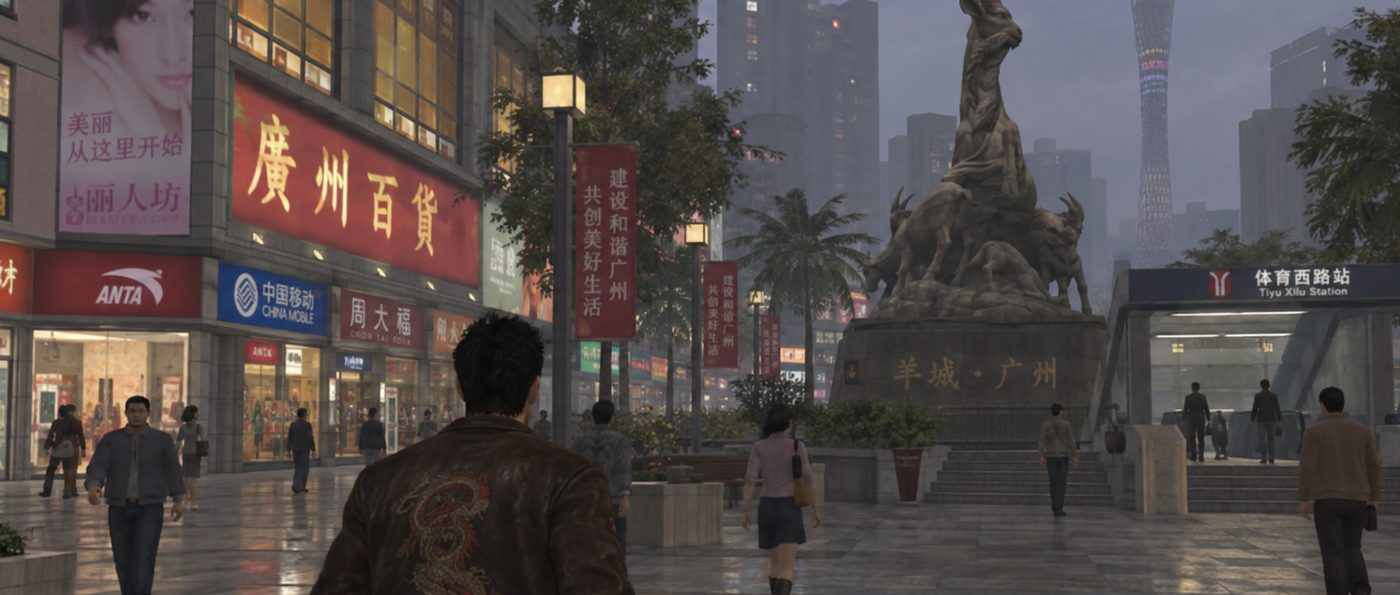
Guangzhou plaza — full Seedance prompt for Higgsfield24.59 seconds, 4:3. References by upload slot, timed shots in seconds and hundredths. This version also supplied a Blender video for camera and blocking. Without one, drop that role and let the timed shots carry the camera.
PART 1 — 24.59 seconds, 4:3
Create a stylized, dialogue-led videogame cutscene. Scene takes place in a Guangzhou plaza. Use <<<image_1>>> for styling reference.

REFERENCE ROLES
Main character image: Match his face, hair, proportions, wardrobe, and accessories consistently.
BLENDER VIDEO — CAMERA AND BLOCKING ONLY: Follow its framing, cuts, camera paths, and character positions. Apply the scene image’s finished game appearance to that structure.
Animate characters with deliberate pose transitions, restrained facial rigs, simple hand shapes, and repeating background walk cycles.
GAME-STYLE SCENE IMAGE — PRIMARY APPEARANCE REFERENCE: Match <<<image_1>>> rendering across the entire frame: character, architecture, foliage, pavement, background people, lighting, and reflections. Preserve its simplified geometry and visibly textured game surfaces throughout every camera cut.
The main character stands sideways to the railing, torso perpendicular to it, one forearm resting naturally on the rail. Keep him predominantly on the right third, looking toward the active camera. Preserve his position and screen direction across cuts.

PERFORMANCE AND CAMERA LANGUAGE
Dry, conversational confidence with quick, clearly articulated delivery. Small expressions and purposeful gestures attached to specific words; hands settle between gestures. Close shots create intimacy, wides reveal context, and locked close-ups land punchlines. Use gentle handheld sway in the wide shot; keep pushes and lateral drifts controlled.

TIMED SHOTS AND EXACT DIALOGUE
All timestamps are seconds and hundredths.

0.00–4.19 — Medium close-up, slow push-in.
Direct eye contact, curious deadpan:
“Why is it called tomfoolery and not just foolery? Who is Tom and what did he do?”

4.19–9.10 — Hard cut wide, full body.
Reveal his relaxed rail lean and the plaza. Almost imperceptible handheld sway; one small explaining gesture:
“Imagine being so ridiculous, your ‘foolery’ gets credited for generations.”

9.10–10.16 — Hard cut to a locked face close-up.
A brief beat, then absolute deadpan:
“I can.”

10.16–15.18 — Medium close-up, slight three-quarter angle, slow lateral drift.
“I came down from space to China to search for my brother in a Chinese time of HIS life. Then I got hungry.”
A small eyebrow movement emphasizes “HIS.” He recounts the story while remaining at the railing.

15.18–19.11 — Medium shot, subtle push-in.
“So I stopped and got some soup dumplings from a spot in Liwan.”
Finish around 19.00; hold briefly.

19.11–24.59 — Cut closer, restrained lateral drift.
Brief appreciation, then matter-of-fact delivery:
“They’re decadent. I order half the menu immediately. Ask him how much. He says eight dollar special.”
End after “special,” before his price reaction.

BACKGROUND AND CONTINUITY
Sparse pedestrians move in both directions at the edges of the wide frame. Animate natural walking and perspective changes. Smaller figures cross the lower plaza and ascend the escalator. Keep the main character’s face and gestures clear.
Use clean hard cuts at the specified times.
City opening — “I know you’re out there, brother”18 seconds, 4:3. A wordless montage ending on one line. Its rough draft is on the Scripting page.
18 seconds · 4:3 · Smooth PS2/PSP-style 3D

Use the supplied references <<<image_1>>> <<<image_2>>> <<<image_3>>> for the main character, <<<image_4>>> for his car, <<<image_6>>> <<<image_7>>> the city, and <<<audio_1>>> for his voice. Smooth shaded geometry, simplified textures, soft bloom. Preserve character and car consistency throughout. Nighttime until the final dawn reveal. No music or subtitles.

Spoken language: English only. Use the supplied audio reference for the main character's voice, tone, and accent. Chinese text appears only on environmental signage. Background crowd chatter is indistinct, with no intelligible words.

0:00–0:01.5 — Above the city
High aerial view looking diagonally down across Guangzhou at night. Slowly push toward the illuminated towers, as if beginning a descent into the city. Distant city hum.

0:01.5–0:03 — Car overhead
Hard cut to a camera flush with the road, looking up between impressive skyscrapers. The Jaguar drives directly over the lens, its underside briefly filling the frame. Engine growl and tire rush.

0:03–0:04.5 — Windshield
Hard cut to the main character through the moving car’s windshield. Tight framing. Neon buildings reflect across the glass while his focused face remains visible.

0:04.5–0:06 — Inside the car
Passenger-side close-up. Gentle road vibration. Passing lights sweep across his face. His eyes shift toward the shops, then forward.

0:06–0:11 — City montage
Six rapid hard cuts. Every shot feels personally observed: handheld camera with subtle sways and small framing adjustments, as though someone is holding it while exploring throughout the city. Tight, selective compositions squeeze fragments of the city into the frame. People, objects, and storefront edges partially come in and out of view.

Shoulder-level view among crowds crossing the street. People pass close to the lens, briefly obscuring the scene.
Close view of sizzling food. Steam rises past the lens as a vendor’s hand enters the frame.
Camera tilts slightly upward toward glowing Chinese signs crowded between building edges.
Scooters pass close by, briefly filling the frame as the camera follows.
A passing glimpse into packed Y2K stalls: electronics, jackets, bags, and toys overlapping within the tight composition.
Handheld sidewalk view. Pedestrians blur past in accelerated time-lapse, suggesting the night slipping away.

Brief overlapping fragments of chatter, sizzling food, footsteps, and engines build the city’s energy.

0:11–0:13.5 — Reflection reveal
Hard cut. The busy soundscape drops to a distant hush. Close view of the penthouse glass from outside, initially filled with the city’s reflection. The main character steps into view behind the glass. Focus shifts to his face, clearly visible beneath faint reflections. The first dawn light touches him.

0:13.5–0:18 — Dawn above the city
Hard cut behind the main character inside the penthouse. He stands at the floor-to-ceiling windows, overlooking the city as early dawn breaks. Slowly pull back from behind his shoulders, revealing the room and expansive skyline.

The main character says exactly in English, without translation or additional dialogue: “I know you’re out there, brother.” Quiet certainty, matching the supplied voice reference. Finish before the final half-second.
Guangzhou plaza — expanded style and staging setupSetup only, no timed shots. This older version used a Blender video for camera.
PART 1 — 24.59 seconds, 4:3
Create a dialogue-led 2006–2008 console videogame cutscene, with period-specific rendering and character animation. Remain in the same Guangzhou plaza throughout.

REFERENCE ROLES

Main character image: Preserve his identity, hair silhouette, proportions, wardrobe, and accessories. Translate his appearance into a 2006–2008 game character.

Blender video: Follow its camera sequence, cut timing, composition, and spatial blocking. The blue stand-in is the main character; rectangular figures indicate pedestrian paths. Replace proxies with finished game characters and deliberate, period-style keyframed animation. Do not inherit mannequin anatomy, sliding locomotion, or unfinished surfaces.

Guangzhou images: Guide the architecture, layout, and environmental colors. Translate the photographic references into the game-rendered style described below.

RENDERING STYLE

Visibly modeled silhouettes, angular clothing folds, hair made from solid clumps or textured cards, and painted surface detail. Simple skin shading, restrained specular highlights, baked-looking environmental lighting, soft shadow maps, and modest texture resolution. Wet pavement uses broad, simplified reflections.

The entire scene should look like an in-engine console cutscene from 2006–2008. Avoid photoreal skin pores, individual hair strands, photographic materials, film grain, VHS overlays, and pixel-art effects.

WORLD AND STAGING

A rainy Guangzhou shopping plaza: curved glass storefronts, striped stone paving, green-tinted glass railings, a sunken shopping court, escalators, and sweeping lattice canopies. Chinese storefront signage, cyan advertising screens, planting, and restrained pink accents. Soft overcast daylight and hazy distant buildings, expressed through simplified game lighting and textures.

The main character stands sideways to the railing, torso perpendicular to it, one forearm resting on the top rail with clear physical contact. Keep him predominantly on the right third, looking toward the active camera. Preserve his position and screen direction across cuts.

CHARACTER ANIMATION AND PERFORMANCE

Dry, conversational confidence with quick, clearly articulated delivery.

Use deliberate keyframed poses, slightly rigid torso movement, simple weight shifts, and short transitions between held poses. Each spoken clause gets one purposeful gesture, followed by a brief settle. Hands use simple open-palm, loose-fist, and pointing poses.

Facial animation uses restrained mouth shapes, simple jaw movement, occasional blinks, eyebrow lifts, and small head tilts. Eyes hold their target between deliberate gaze changes. Avoid continuous facial micro-expressions, fluid motion-capture acting, and lifelike finger articulation.

Background pedestrians use recognizable looping walk cycles with modest variation. Keep feet grounded and contact believable while retaining the slightly mechanical quality of period game animation.

CAMERA LANGUAGE

Close shots create intimacy, wides reveal context, and locked close-ups land punchlines. Follow the reference video’s camera movement and cuts. Handheld movement is a subtle authored sway in the wide shot; pushes and lateral drifts remain controlled, and locked shots remain still. Keep camera playback smooth.
Source tutorials
- Higgsfield · Sept 2026
Higgsfield 3D Jutsu
A workflow that blocks a scene with grey 3D proxies, renders the camera move as a previz video, then combines it with character and location references to generate the final shot. Its example prompt is split into labelled sections — scene context, references, location map, blocking, optics, camera, performance, timing, physics, lighting and audio.
Contributed: the labelled, section-by-section prompt structure.
- @adilinthewild · Higgsfield blog
This Blender + Higgsfield AI workflow changes how you make AI video
Five workflows — a one-take fight, a dialogue scene, elaborate camera movement, a soda ad and a car commercial — using Claude and Blender to block scenes before generation.
Contributed: the scene-planning structure, with blocking and camera written in text through Codex and ChatGPT.
Downloadable materials
How to use them
- Turn drafts into prompts with the skill.Use the cutscene prompt skill to turn a rough draft into a ready-to-use Seedance prompt. In Claude, upload the ZIP as a skill; in Codex, unzip it into
~/.codex/skills; with any other assistant, attachSKILL.mdand thereferencesfolder to the chat. - Give the rest to the assistant as context.Attach the production grammar, the prompt framework template and the camera vocabulary alongside the character, background and script. The assistant then writes in the same structure and camera language.